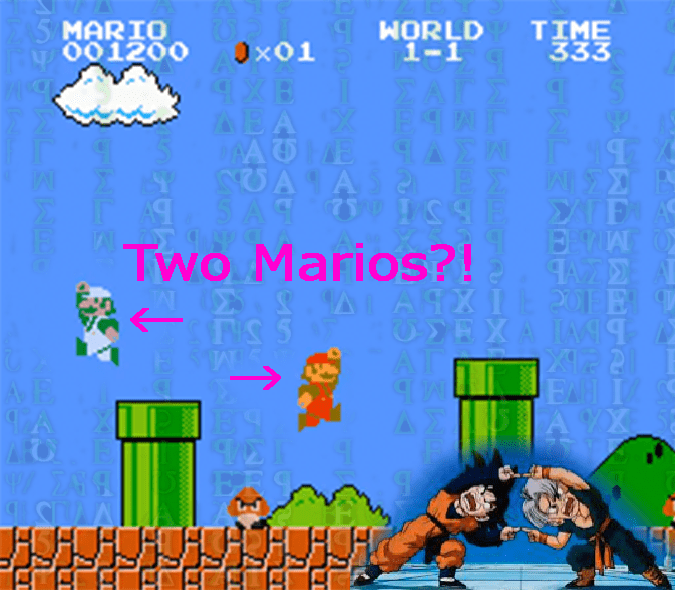
Having fond memories of playing SMB in the kitchen I was inspired to find a way to make it possible to play it with another person using the power of post-1985 technology. Presently the only possibility I know is by using an emulator with scripting capabilities. I will briefly explain the approach in the following section (or skip straight to the installation section).
Approach
The SNES emulator FCEUX can run any of its games with a LUA script allowing you to programmatically control the game character and environment frame by frame. In LUA script it looks something like this:
while true do
	-- do something
	emu.frameadvance(); -- advances the frame of emulator
end
The simplest two-player interface would be that the 2nd player’s character shows up on the other player’s screen without interacting in “their world”. So the position of the 2nd player’s Mario in their world needs to be transmitted to the 1st players Mario session, and vis-versa. The positions of Mario can be accessed from the game RAM as follows (taken from this super nice site https://datacrystal.romhacking.net/wiki/Super_Mario_Bros.:RAM_map):
marioX = memory.readbyte(0x6D) * 0x100 + memory.readbyte(0x86) --horizontal position on game screen
marioY = memory.readbyte(0x03B8)+16 --vertical position on game screen
Just knowing the position doesn’t add to the gameplay experience so I overlay an image of “Luigi” or green Mario on both of the players’ screens. To add to the immersion I also read out the different actions, such as jumping, running, sitting, big/small, etc (see inside the code for the RAM codes), and create the appearance of animation by including the corresponding sprites.

In LUA the images can be overlayed into the game screen by using the gd package and then initializing your image first as follows:
require "gd"
imLSR = gd.createFromPng("Luigi_stand_R.png"):gdStr()
Then in the game loop (where emu.frameadvance() is used) the following line should appear gui.gdoverlay(drawX, drawY,imLSR). Here drawX and drawY are the variables for the coordinate to draw the image in the game screen, which corresponds to the position of Mario of the other player.
Networking
From here it gets complicated… The player position and state is sent over through TCP/IP protocol (although UDP might be better) to the other computer using the LuaSocket package. For TCP/IP which computer is host and which is client needs to be decieded and there will be two different LUA scripts. So on the host computer the following LUA code needs to appear before the game emulation loop:
local socket = require("socket")
local server = assert(socket.bind("*", 8999)) --the number is the port number, keep the same unless port is blocked
local ip, port = server:getsockname() -- get ip and port of host computer
On the client only two lines need to appear before the game loop:
tcp = assert(socket.tcp())
tcp:connect(host, port);
Then within the game loop data is sent and received on both host and client using the client:send(dataout) and datain = client:receive() commands, respectively. Per the send command the data type must be a string. Therefore the position and state variables are packaged into a string with a call like this dataout = Table2String({marioX,marioY,walkframe,movedir,floatst,powerst}), where {...} creates a table of the variables inside and the function is defined as:
function Table2String(myTable)
	Str = myTable[1] --Create string with first element of the table
	for i = 2, #myTable do --#myTable is the length of the table
		Str = Str .. "," .. myTable[i] --Append each element to str
	end
	return Str
end
This code simply takes the numerical value in each element of the table and appends it to a comma delimited string, e.g. {2,5,6} just becomes “2,5,6”. Nothing fancy. The string is then sent over TCP/IP to the client computer where it is received as datain and then the string is parsed as follows:
datatable = datain:split(",") --split the comma delimited string into a table
marioX_host,marioY_host = tonumber(datatable [1]), tonumber(datatable [2])
walkframeH,movedirH = tonumber(datatable [3]), tonumber(datatable [4])
floatstH,powerstH = tonumber(datatable  [5]), tonumber(datatable [6])
To synchronize the two game sessions we employ a savestate trick. Basically have a savestate file prepared for both computers (using the emulator to create one) and when the network connection is made it automatically starts that savestate for both computers so the game states are perfectly synchronized. I do this as follows:
SavestateObj = savestate.object(1) --savestate file on slot 1
print("Connecting to host...")
while true do
	local noerr = TCPIP_CheckConnection() --checks for connection to other computer
	if noerr then break end --break loop if no error for connection (err=1), i.e. connection established
	emu.frameadvance(); --game runs as usual until the connection is made (otherwise screen is frozen)
end
savestate.load(SavestateObj); --Load the defined save state object (now both computers synchronized)
Where TCPIP_CheckConnection() will return the error status of the TCPIP connection, if its value is 1 then a connection has been made:
function TCPIP_CheckConnection()
	tcp = assert(socket.tcp())
	local noerr = tcp:connect(host, port);
	return noerr
end
BONUS feature
To make this two-player mode more interesting I added a feature that makes both Marios go into star mode if their positions on the screen overlap:
if dX^2+dY^2<100 then --if the distance between two Marios less than 100 pixels
    memory.writebyte(0x079F,0x0F)--star power, max duration = 0x0F
else
    memory.writebyte(0x079F,0) --ends star power
end
Limitations
Currently it works smoothly over LAN but couldn’t get smooth performance over the internet. The TCP/IP protocol used will try to make sure all packets are sent so if there is some internet lag it can start to make the game slow as it waits for the packets to arrive/send.
I welcome any improvements to the script in the GitHub repository.
INSTALLATION:
(On both the host and client computer)
- Download FCEUX (http://sourceforge.net/projects/fceultra/files/Binaries/2.2.3/fceux-2.2.3-win32.zip/download)
- Download LuaSocket (http://files.luaforge.net/releases/luasocket/luasocket/luasocket-2.0.2/luasocket-2.0.2-lua-5.1.2-Win32-vc8.zip)
- Download Lua-GD (https://sourceforge.net/projects/lua-gd/files/latest/download)
- Copy the folders lua, mime, socket in LuaSocket to the main directory of FCEUX
- Copy the .dll files in Lua-GD to the main directory of FCEUX
- Download the marioNET lua script from my github repository (https://github.com/TheCodeWanderer/marioNET) and unpack it into a folder (e.g. ../FCEUX/luaScripts/marioNET)
- (On host computer) Download "marioNET.lua" from repo and place it into above folder
- (On client computer) Download "marioNET_client.lua" from repo and place it into above folder
BEFORE STARTING:
- Run Super Mario Bros in FCEUX
- Start with Mario
- Create a savestate on slot 1 the moment the level starts
- Copy the savestate file (.fc1 extension) in \fcs\ to the same folder on client’s computer
- (On client computer) In the "marioNET_client.lua" script file change the default IP address to the host computer’s IP
RUNNING THE SCRIPT:
- Start FCEUX
- Open ROM -> Super Mario Bros
- File -> Lua -> New Lua Script Window…
- (On host computer) Browse -> "marioNET.lua", Press Run
- (On client computer) Browse -> "marioNET_client.lua", Press Run
TESTED USING:
- Windows 7 (64-bit)
- fceux-2.2.3-win32
- luasocket-2.0.2-lua-5.1.2-Win32-vc8
- lua-gd-2.0.33r2-win32
 Code Wanderer